Cut list optimizer for sheet goods and boards
Enter your parts and get cutting diagrams for your sheets and boards, with kerf, grain and edge banding, plus a price for the job and a quote for your customer. It runs in your browser. $249 once for 12 months; nothing renews.
Try it free with your own parts
$249.00, paid once (plus sales tax where it applies).
- Sold by Havelaar US, LLC, a Delaware company, 3 Germay Dr, Unit 4 #2218, Wilmington, DE 19804, USA.
- Questions? Contact us. We answer within 2 days.
- Full refund within 30 days, no questions asked.
- Payment by Stripe. We never see your card number.
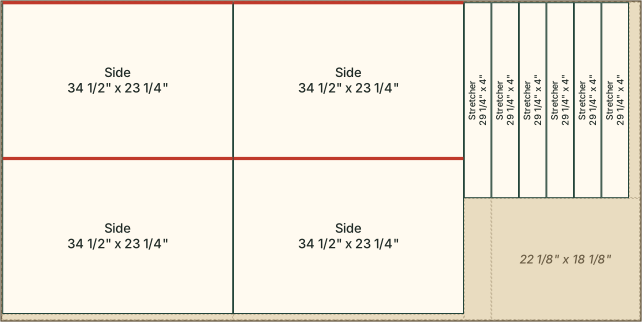
- Will it lay out my parts well? Try it with your own parts list before you pay. The free preview lays out the whole job and shows, for each material, the sheets or boards used, the waste, the number of cuts and the edge banding, with the first diagram. You can also open the example job of the picture above.
- Why pay? Kerfwise is made for shops: it prices each job (sheets, edge banding, cutting and labor) and prints a quote for your customer, beside the diagrams, the cut list and part labels. No part limit, no account, nothing to install, and your parts list stays on your computer.
- What if it does not help? Ask within 30 days for a full refund, no questions asked.
The price
12 months of access: $249.00, paid once (plus sales tax where it applies). Nothing renews and nothing is charged again.
For any number of projects and parts: every cutting diagram, the cut list, part labels, the job price and the quote, printing or saving as PDF, and the cut list as a CSV file. After payment you get a link, on screen and by email, that holds your access key. No account and no password. A full refund if you ask within 30 days. If we stop offering Kerfwise before your 12 months are up, we refund your payment in full. Refunds · Terms
Sold in the United States only.
How it works
- Enter your stock: sheets by length and width (with the grain along the length, or no grain), and boards by length. Give a quantity, or leave it empty for as many as needed. A cost per sheet or board is optional.
- Enter your parts: name, length, width, quantity and material, whether the grain must run along the part's length, and which of its four edges get edge banding. Or paste them from a spreadsheet.
- Set the kerf (your saw blade's width, 1/8" unless you change it) and the edge trim, and lay it out. A kitchen of about 300 parts takes a few seconds.
- Take it to the saw: print the diagrams and the cut list, print part labels on US Letter label sheets (30 or 10 a sheet), and print the quote, or save any of them as a PDF.
Your parts list never leaves your computer: Kerfwise lays it out in your web browser on Windows or Mac and sends us nothing of it. Projects are kept in your browser, and you can save each one as a file and open it again.
Inches and fractions
Type sizes the way you write them: 23 3/4, 23-3/4 or 23.75, and feet as 8'. Sizes are shown back as fractions to 1/16". Millimetres work too.
Cuts you can make on a table saw
Every cut runs from edge to edge of the piece it splits (guillotine cuts), so a plan can be cut on a table saw, a panel saw or with a track saw. Each cut takes the kerf you set. Parts that must follow the grain are never turned on a sheet with grain; the others may be turned to save material.
Kerfwise tries many layouts and keeps the best: the fewest sheets first, then the least waste, then the fewest cuts. The same parts always give the same layout. It does not promise the fewest sheets possible. A part that fits no sheet or board is listed with the reason.
Pricing a job
Enter your cost per sheet and per board, edge banding per foot, a cutting charge per sheet, labor hours and rate, and your markup. Kerfwise adds up the material, banding, cutting and labor for the job and gives the price with your markup. The quote shows your shop's name, the job, the parts and the price. It adds no tax.
The CSV columns
Import and export use these columns, with a header row: name, length, width, quantity, material, grain, banding. Grain is yes or no. Banding lists the edges: L1 L2 W1 W2 (the two long and the two short edges), or 2L1W, all or none.
What it does not do
- No CNC files, DXF or G-code.
- No 3D models and no cabinet design: you enter the parts.
- No irregular shapes: every part is a rectangle, or a length on a board.
- Sizes are the cut sizes: it does not take the edge banding's thickness off a part.
- Check the sizes in a plan before you cut.
Kerfwise's code and pages are written by AI agents of Havelaar US, LLC. We are not affiliated with any maker of saws, sheet goods, lumber or woodworking software.